A useful Layer 1 watchlist starts with a clear symbol universe, not a static ranking. For TradingView users, that means separating asset identity, network classification, ecosystem membership, and the exact exchange-qualified symbols TradingView can import.
A trader searching for a Layer 1 crypto list often faces three problems at once: finding the relevant base-layer assets, identifying the correct exchange symbols, and preventing ecosystem tokens from getting mixed into a broad market screen. This roundup uses Bitcoin, Ethereum, Solana, Cardano, Polkadot, Avalanche, Cosmos, NEAR, Sonic, and TRON as watchlist building blocks. Current exchange availability, supported categories, and ticker formatting still require verification at publication and before import.
The grouping method is deliberately practical. Market-cap and category lists help define the symbol universe. Exchange-specific lists help confirm venue coverage. Ecosystem lists help separate assets connected to a particular network from the network's base asset. TradingList can support that workflow with crypto watchlists compatible with TradingView, organized by centralized exchange, market-cap range, supported category, ecosystem, and custom criteria, with export, comparison, and filtering. It is not an exchange, broker, adviser, trading platform, signal provider, or official TradingView integration.
Practical rule: An asset ticker is not automatically a complete TradingView symbol.
ETHidentifies the asset, while a venue-specific format such asEXCHANGE:ETHUSDTidentifies the market and pair.
Table of Contents
- 1. Ethereum ETH
- 2. Bitcoin BTC
- 3. Solana SOL
- 4. Cardano ADA
- 5. Polkadot DOT
- 6. Avalanche AVAX
- 7. Cosmos ATOM
- 8. NEAR Protocol NEAR
- 9. Sonic S
- 10. TRON TRX
- Layer 1 Watchlist Import Reference
- Turn the Roundup Into a Reliable TradingView Workflow
1. Ethereum ETH
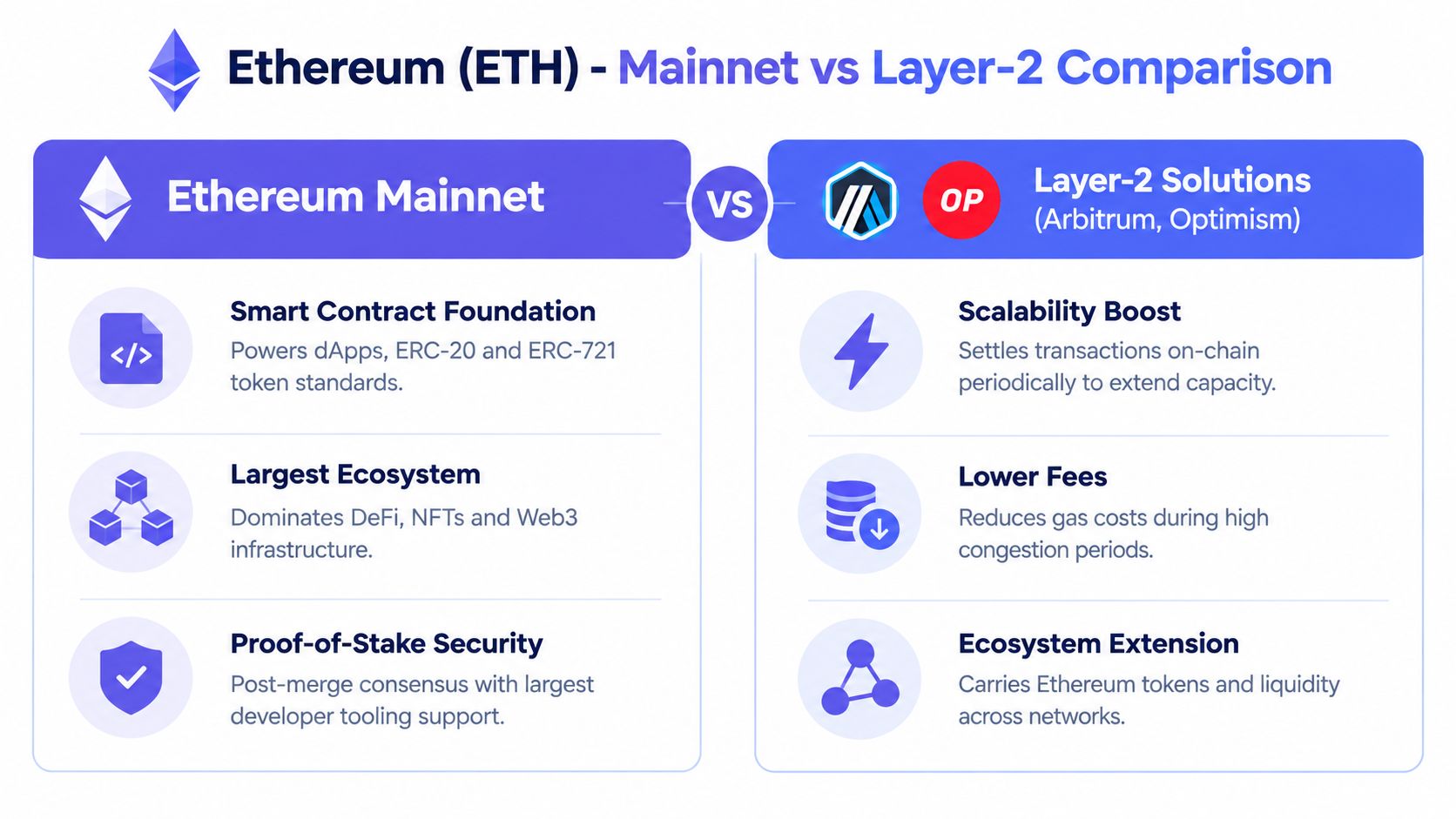
Ethereum belongs in most Layer 1 watchlists because it is a base-layer network with its own native asset, validator set, and mainnet market identity. For TradingView users, the practical point is to keep ETH separate from Ethereum-associated tokens, bridges, and scaling assets.
That distinction is useful because TradingView imports work at the market-symbol level, not at the narrative ecosystem level. An Ethereum ecosystem list may contain assets connected with decentralized applications, token standards, and infrastructure, but those assets can trade on different venues and under different symbols. A market-cap or Layer 1 list answers a different question, namely which base-layer assets belong in the comparison set.
Ethereum's official proof-of-stake documentation supports a few precise research distinctions that can matter in watchlist notes. The network uses 12-second slots and 32 slots per epoch, and solo staking requires 32 ETH, as described in the Ethereum proof-of-stake documentation and Ethereum staking documentation. Those details help explain why analysts often separate the base asset from staking-related or ecosystem-related exposure.
Blockstream's explanation of Bitcoin economics
Build separate Ethereum segments
A clean configuration can include:
Core asset: ETH on the selected centralized exchange and quote pair.
Mainnet ecosystem: Supported Ethereum-associated assets, normalized to their actual TradingView venues.
Scaling ecosystem: Layer 2 assets kept separate from Ethereum mainnet symbols.
Layer 1 comparison: ETH placed beside other Layer 1 base assets rather than mixed with every Ethereum-associated token.
This separation helps prevent a common error. A token can be Ethereum-associated without being an ETH market, and a bridge or Layer 2 version can have a different venue symbol from its mainnet counterpart. Readers researching adjacent networks can also use this Base chain tokens guide as a related workflow reference.
2. Bitcoin BTC
A Layer 1 watchlist often needs one reference asset before comparing other networks. Bitcoin fills that role, while its design remains distinct from smart-contract platforms. Bitcoin's official documentation states that supply is capped at 21 million coins, the subsidy is reduced every 210,000 blocks, and issuance is expected to end around 2140, according to the Bitcoin halving overview on Bitcoin.org.
For watchlist construction, BTC belongs in broad Layer 1 and macro comparison groups alongside ETH, SOL, and other base-layer assets. A separate venue list should capture the instrument available for analysis. The generic BTC ticker does not specify whether a chart represents spot, derivatives, or a pair on a particular exchange.
Build Bitcoin watchlist layers
Organize BTC by research purpose rather than by ecosystem:
Layer 1 reference: Place BTC beside other base-layer assets for category comparisons.
Exchange market: Use the confirmed venue symbol and pair, such as
EXCHANGE:BTCUSDT, only after checking that the exchange lists it.Instrument type: Keep spot and derivatives in separate lists where the venue supports both.
Network category: Store Bitcoin in its own foundational-network group, apart from smart-contract ecosystem assets.
This arrangement separates a generic asset ticker from a venue-specific TradingView symbol. It also prevents a spot chart and a derivative chart from appearing as though they represent the same market.
The workflow remains practical: readers building alerts around BTC can consult this Bitcoin price alert guide. The result is an import-ready reference block, not an investment ranking.
3. Solana SOL
For a watchlist import, Solana is a network category first and a ticker second. SOL represents the Layer 1 asset. Native SPL tokens, decentralized applications, and infrastructure projects require separate classification because their market identity and exchange availability may differ.
That classification point matters more than a short ticker. A Solana-linked token may trade on a centralized exchange under a symbol that does not reveal its network relationship, so a clean watchlist keeps the base asset and ecosystem assets in separate blocks.
CoinGecko Layer 1 category page
Organize Solana watchlist blocks
Set up the list by research function:
SOL Layer 1 reference: Keep SOL with other Layer 1 assets for category comparison.
SOL venue symbol: Record the selected exchange and exact pair, such as
EXCHANGE:SOLUSDT, after confirming availability.Solana ecosystem: Add supported SPL assets only when their classification and current listing are verified.
Venue comparison: Store the same asset's symbols across supported exchanges separately from its generic ticker.
The generic SOL ticker identifies the asset, not the specific spot market, derivative, exchange, or quote currency. A venue-qualified TradingView symbol preserves that distinction during chart imports and prevents unrelated instruments from being merged.
This organization makes SOL comparable with Ethereum at the network level while keeping smaller ecosystem assets visible without labeling them all as Layer 1 assets. The supplied image also reflects the infrastructure layer behind these networks.
4. Cardano ADA
A watchlist importer may recognize ADA immediately, yet still misclassify the assets around it. ADA belongs in the core Layer 1 set. Cardano-associated tokens need a separate ecosystem label, with inclusion based on verified listings rather than network affiliation alone.
Cardano's proof-of-stake design and UTXO-based architecture also affect organization. Cardano-native assets may have different centralized-exchange availability and pair formats from Ethereum-associated assets, so a generic ticker is insufficient for an import-ready list.
Build the Cardano block by verification status
Use four fields rather than one undifferentiated token list:
ADA reference: Record ADA for Layer 1 comparison, then attach the chosen exchange and quote pair.
Cardano ecosystem: Add only assets confirmed through the selected ecosystem or category source.
Venue check: Verify centralized-exchange availability and the exact TradingView symbol before import.
Research notes: Keep governance and protocol developments separate from tradable symbols.
This layout preserves ADA as the network-level reference while exposing which surrounding assets have confirmed venue coverage. It also separates a generic ticker from a venue-specific TradingView symbol, reducing the chance that an importer combines different instruments under one label. The resulting list is narrower, but its categories are easier to audit and maintain.
5. Polkadot DOT
A researcher importing a Layer 1 watchlist may place DOT beside parachain tokens, then lose the network distinction inside one workspace. Polkadot's relay chain, parachains, and specialized networks serve different roles, while centralized-exchange coverage and TradingView identifiers vary by asset. A generic ticker therefore needs ecosystem and venue context before import.
Keep DOT as the network reference, then organize related assets by network relationship. Acala, Moonbeam, Astar, and Phala belong in separately labeled parachain groups rather than beside DOT without qualification. Governance, token distribution, and event monitoring should remain research fields, not replacements for verified trading symbols.
Separate the relay chain from parachain assets
A practical Polkadot watchlist can assign:
DOT reference: Use DOT for Layer 1 comparison, then record the selected exchange, quote pair, and TradingView symbol.
Relay-chain assets: Include only symbols directly associated with the core network.
Parachain groups: Create a section for each supported parachain or ecosystem category.
Venue variants: Preserve exchange-specific symbols instead of merging markets under one ticker.
This structure keeps the relay chain from becoming a catch-all label. It also lets analysts review parachain developments without treating ecosystem membership as proof of centralized-exchange availability. Before importing, verify each symbol against the chosen venue and separate market data from research notes.

6. Avalanche AVAX
A TradingView watchlist can misclassify an Avalanche asset if it treats the network name as the market identifier. Avalanche is a Layer 1 network, while AVAX is its base asset. Application tokens and bridged assets require separate labels, ecosystem categories, and venue verification.
Start with network classification and centralized-exchange availability, then normalize symbols for the selected TradingView feed. The same project may appear on Ethereum and Avalanche, so a generic ticker cannot confirm which version a chart represents. Exchange prefix, quote pair, and venue-specific symbol carry more identifying information than the short ticker alone.
A practical Avalanche workspace can use these fields:
AVAX core: Record the confirmed centralized-exchange market and its TradingView symbol.
Avalanche ecosystem: Group supported application assets under the network, without implying that every asset has a comparable venue market.
Protocol grouping: Label infrastructure and application assets where the watchlist includes them.
Cross-network variants: Keep separate entries for assets issued or traded across multiple networks.
For classification purposes, an Avalanche-associated market and an Ethereum-associated version should remain separate unless the chosen data source confirms they are the same instrument. The Avalanche ecosystem coins guide offers a related way to organize network-associated assets.
7. Cosmos ATOM
A Cosmos watchlist can become misleading if every connected token is placed beside ATOM without a role label. Cosmos is an ecosystem of interconnected zones, while ATOM identifies the Cosmos Hub. Other symbols may belong to independent zones with separate governance, validators, and market structures.
Use that distinction to organize the assets before importing charts. Osmosis, THORChain, and Juno may be grouped under Cosmos ecosystem association, but each entry should retain its network role. A comparison with ATOM is clearer when the symbol is identified as a Hub asset, an application-chain token, or a venue-specific market.
A practical file can use role labels rather than one long list:
Hub assets: ATOM and symbols directly supported by the Cosmos Hub.
Zone assets: Application and interoperability zones recorded in separate groups.
Layer 1 context: Cosmos-associated assets compared by role, without treating their network labels as equivalent.
Exchange symbols: Venue-specific tickers normalized independently from ecosystem labels.
IBC connectivity does not establish a shared trading market. An asset can move through an interoperability system while remaining separate, with its own listing and symbol. Confirm the centralized-exchange market and the TradingView feed before adding a chart. This keeps generic asset names distinct from import-ready venue symbols and reduces duplicate or misleading entries.
8. NEAR Protocol NEAR
NEAR adds a developer-focused Layer 1 to the watchlist. Its role is clearest when the native asset, ecosystem applications, and connected environments are recorded as separate import groups. NEAR remains the core asset, while surrounding symbols need labels supported by the source classification.
Those categories explain an asset's ecosystem relationship. They do not establish a centralized-exchange market or a TradingView feed. Record generic asset tickers first, then map each supported market to its venue-specific symbol before importing charts.
Keep application groups distinct
A NEAR workspace can include:
NEAR core: The confirmed market, including the relevant venue-specific NEAR quote pair.
Application groups: Supported ecosystem assets grouped by function.
EVM-related assets: Aurora EVM symbols labeled separately from native NEAR application groups.
Layer 1 comparison: NEAR placed in the broader base-layer universe.
The Aurora distinction prevents an EVM-connected asset from appearing to be a native NEAR application or a second representation of the base token. It also lets research teams compare ecosystem association without merging different network roles.
Use the import file as an organized set of watchlist building blocks. Keep the generic ticker, network role, application category, and venue symbol in separate fields. This preserves context while making the TradingView chart mapping explicit.
9. Sonic S
Sonic belongs in this roundup as the current base asset for the Sonic network. For watchlist purposes, the important point is migration context: Sonic migrated from Fantom, but FTM and S should not be treated as interchangeable symbols in a TradingView import file.
That means a generic asset label is not enough. Readers should verify the current exchange-qualified TradingView symbol for Sonic on the venue they actually use, including the exchange prefix and quote pair. If an exchange still exposes legacy Fantom-related naming in some context, do not assume it maps to the same market as a current Sonic listing.
A practical Sonic block can stay narrow:
S core: Record the current exchange-qualified TradingView symbol only after checking the venue listing.
Migration note: Keep a plain note that Sonic migrated from Fantom.
Separate legacy references: Do not merge older Fantom labels or symbols into the Sonic import line unless the venue explicitly confirms the mapping.
Import check: Test the exact TradingView symbol before adding Sonic to a larger watchlist file.
This keeps the Sonic entry accurate and reduces the risk of importing the wrong market under an outdated ticker assumption.
10. TRON TRX
TRON is a Layer 1 network, and TRX is its native asset, as described in the official TRON documentation. For watchlist construction, keep TRX separate from TRON-issued or ecosystem tokens so the base asset does not get mixed into a broader network screen.
As with the other entries in this roundup, a generic ticker is not enough for an import-ready file. Readers should verify the current exchange-qualified TradingView symbol, quote pair, and instrument type before adding TRX to a watchlist. That keeps the asset label separate from the exact market TradingView will import.
Layer 1 Watchlist Import Reference
| Network / base asset | Classification note | Verify before import |
|---|---|---|
| Ethereum / ETH | Layer 1 base asset. Keep separate from Ethereum ecosystem tokens and Layer 2 assets. | Exchange prefix, quote pair, spot vs derivative market, and exact TradingView symbol. |
| Bitcoin / BTC | Foundational base-layer asset. Keep separate from derivative variants and wrapped representations. | Exchange prefix, quote pair, instrument type, and exact TradingView symbol. |
| Solana / SOL | Layer 1 base asset. Keep separate from SPL ecosystem tokens. | Venue listing, quote pair, and whether the imported symbol is the intended market. |
| Cardano / ADA | Layer 1 base asset. Keep separate from Cardano-associated ecosystem assets. | Exchange support, quote pair, and TradingView symbol formatting. |
| Polkadot / DOT | Layer 1 relay-chain asset. Keep separate from parachain tokens. | Exchange-qualified symbol, quote pair, and network role in your list. |
| Avalanche / AVAX | Layer 1 base asset. Keep separate from Avalanche-associated applications and cross-network versions. | Venue, pair, exchange prefix, and whether a similarly named asset exists on another network. |
| Cosmos / ATOM | Cosmos Hub asset. Keep separate from zone assets even when ecosystem-associated. | Hub vs zone role, venue listing, and exact TradingView symbol. |
| NEAR / NEAR | Layer 1 base asset. Keep separate from Aurora and other NEAR-associated assets. | Exchange support, quote pair, and whether the symbol refers to the native asset or a related environment. |
| Sonic / S | Layer 1 base asset for Sonic. Do not assume Fantom-era labels are interchangeable with Sonic symbols. | Current exchange-qualified TradingView symbol, venue support, and any migration-related naming differences. |
| TRON / TRX | Layer 1 base asset. Keep separate from TRON-issued or ecosystem tokens. | Exchange prefix, quote pair, instrument type, and exact TradingView symbol. |
Turn the Roundup Into a Reliable TradingView Workflow
A Layer 1 crypto list becomes useful when the symbols can be imported, understood, and maintained. The first step is verification. Check that each asset is currently available on the selected centralized exchange, confirm the quote pair, and review whether the market is spot or another instrument type. A category page may identify an asset as Layer 1, but it does not automatically confirm a specific venue symbol.
Next, choose the universe that matches the research question. A market-cap watchlist is appropriate for comparing a broad set of assets, while a supported-category watchlist is better for a defined classification. An ecosystem watchlist answers a network-association question. These views should not be merged without labels because Bitcoin, Ethereum, smart-contract platforms, relay-chain assets, zones, and application tokens do not represent the same exposure.
Symbol normalization comes after selection. Convert generic tickers into venue-specific TradingView formats such as EXCHANGE:PAIR, then check exchange prefixes, pair spelling, separators, and naming changes. Bridge, parachain, zone, and wrapped-token variants deserve separate review because the same project can appear in more than one network context.
TradingView's official import guidance also matters here. Its help documentation says watchlists should be imported from a .txt file using comma-separated, exchange-prefixed symbols, for example NASDAQ:AAPL,OANDA:EURUSD, through the watchlist import option in the platform interface. See TradingView's official guidance on how to import or export a watchlist and watchlist management.
A practical import sequence
Verify availability: Confirm the asset, venue, pair, and instrument type.
Select the universe: Use market cap, supported category, centralized exchange, or ecosystem filters.
Separate ambiguous variants: Keep bridge, parachain, zone, wrapped-token, and network-specific representations distinct.
Normalize symbols: Convert generic tickers into the exact TradingView-compatible format.
Format the import file: Use a
.txtfile with comma-separated, exchange-prefixed symbols, following TradingView's official import guidance.Test a small file: Import a limited group before expanding the complete watchlist.
Review unmatched symbols: Remove or correct entries that TradingView does not resolve as expected.
TradingList can support different stages of this workflow. It provides crypto watchlists compatible with TradingView, organized by centralized exchange, market-cap range, supported category, ecosystem, and custom criteria, with export, comparison, and filtering. These tools organize symbol universes. They do not provide signals, forecasts, portfolio advice, or financial advice.
The most durable setup therefore keeps three labels visible: what the asset is, why it belongs in the list, and where the symbol trades. Watchlists organize research and charting. They do not predict prices or turn a category list into an investment recommendation.
TradingList offers maintained, TradingView-compatible crypto watchlists organized by centralized exchange, market capitalization, supported category, and ecosystem, along with custom filtering, comparison, and export tools. Readers building a Layer 1 workflow can review the available symbol universes and import options at TradingList, then verify the selected venue and symbols before use.