A trader can hold Bitcoin on one exchange, altcoins on another, assets controlled through keys secured by a hardware wallet, and additional positions in a DeFi wallet, then open several dashboards just to estimate a net balance. The problem isn't only missing data. Each tool answers a different question, and the answers rarely line up cleanly.
A crypto portfolio tracker can monitor balances, calculate performance, support cost-basis work, or organize the symbols used for market review. TradingView can handle charting and watchlists, but it expects venue-qualified symbols. A spreadsheet can preserve the reasoning behind every position, although manual maintenance becomes burdensome quickly. The practical answer is usually a stack, not a single app.
| Method | Best at | Main weakness | TradingView value |
|---|---|---|---|
| Built-in exchange or wallet tracker | Current balances within one venue | Limited cross-venue context and inherited symbol coverage | Useful as a separate charting layer |
| Third-party portfolio app | Aggregated balances, P&L, and reporting | Depends on APIs, address parsing, and provider-maintained asset mappings | Often limited for custom symbol universes |
| Spreadsheet plus watchlist | Custom cost basis, notes, and full control | Manual or semi-manual upkeep | Strong, if symbols are normalized before import |
| TradingView-native watchlist workflow | Clean, venue-specific market monitoring | Doesn't replace position or tax accounting | Best for symbol hygiene and chart review |
Table of Contents
- Why Tracking a Crypto Portfolio Is Now a Workflow Decision
- Three Main Approaches to a Crypto Portfolio Tracker
- Comparing Built-In Trackers, Third-Party Apps, and Spreadsheet Watchlists
- TradingView Watchlist Import Format and Symbol Hygiene
- Building a Clean Symbol Universe for TradingView
- Connecting a TradingView-Compatible Watchlist Workflow
- Matching the Right Method to Your Trader Profile
- Practical Questions on Reconciliation and Multi-Chain Tracking
Why Tracking a Crypto Portfolio Is Now a Workflow Decision
A portfolio manager who checks positions across multiple exchanges and wallets is not looking for a larger dashboard. The manager is trying to reconcile ownership, exposure, performance, and market symbols at the same time. Those tasks overlap, but they aren't identical.
The scale of the market makes that distinction more important. Dedicated portfolio tools now advertise coverage across 10,000+ assets and 50+ blockchains, as shown by Datawallet’s portfolio tracker. That breadth means a portfolio view can contain thousands of possible assets, venues, and quote pairs, while a usable TradingView watchlist may need only a carefully selected subset.
Three layers answer three different questions
Monitoring asks, “What does the trader own right now?” It depends on exchange connections, wallet addresses, transaction recognition, and a sensible valuation method.
Analytics asks, “How has the portfolio performed?” That requires realized and unrealized P&L, allocation views, historical records, and cost-basis logic. Modern trackers advertise features such as P&L, allocation breakdowns, backtesting, and coverage across thousands of assets and multiple blockchains, a shift described in the portfolio-tracker analysis from Datawallet.
TradingView-native symbol hygiene asks, “Which instruments belong on the charting list?” That requires exact exchange prefixes, consistent spot or derivatives treatment, stable quote conventions, and a process for removing stale pairs.
Practical rule: A balance tracker consumes positions. A TradingView watchlist consumes symbols. Treating them as the same product creates avoidable errors.
A trader may therefore use one tool for balances, another for tax lots, a spreadsheet for exceptions, and TradingView for charts. The friction between those layers, not the number of dashboard features, should determine the tracker method.
Three Main Approaches to a Crypto Portfolio Tracker
The first approach is the built-in exchange or wallet tracker. It provides the most direct view of assets held in that venue and usually requires little setup. The trade-off is structural: the user inherits the exchange's asset names, pair conventions, and listing scope. A venue dashboard can show an accurate local balance while offering little context about assets held elsewhere.
The second approach is a third-party portfolio app. These services commonly aggregate exchange APIs and public wallet addresses, then add portfolio analytics, historical views, and tax-oriented exports. Their strength is consolidation. Their weakness is dependency. API permissions can change, wallet activity can be difficult to classify, and provider-maintained symbol mappings may lag behind new listings or naming changes.
The third approach combines a spreadsheet with a TradingView watchlist. The spreadsheet stores positions, acquisition details, notes, and exceptions. TradingView handles price charts, alerts, and market review. This method demands more discipline, but it gives analysts control over columns, naming conventions, quote currencies, and the distinction between a held asset and a watched instrument.
The key distinction buyers often miss
A price tracker can tell a user what an asset is worth. A position tracker must explain why the balance exists, where it sits, and how transactions affect cost basis. Those are different data problems.
Independent comparisons therefore evaluate coverage, exchange connectivity, DeFi decoding, tax exports, privacy, and reproducible history rather than basic price display. CoinCodeCap's current comparison evaluates trackers by coverage, DeFi and NFT detection, tax and export capabilities, price, free-tier value, and privacy. It also distinguishes on-chain tools such as Zerion and DeBank from products that read centralized-exchange balances, reinforcing that no tracker is universally strongest.
Comparing Built-In Trackers, Third-Party Apps, and Spreadsheet Watchlists
The best method depends on where the portfolio's complexity lives. If all activity happens on one exchange, a built-in dashboard may be sufficient. If the challenge is transaction classification across venues, an aggregation app is more appropriate. If the difficult part is deciding exactly which instruments should appear in TradingView, a spreadsheet and normalized watchlist provide more control.
| Criterion | Built-in tracker | Third-party app | Spreadsheet + watchlist |
|---|---|---|---|
| Setup effort | Low within one venue | Moderate, with API and wallet connections | Moderate to high, depending on fields |
| Cross-venue coverage | Usually limited | Stronger, subject to supported connections | Flexible, but often manual |
| Analytics depth | Basic to moderate | Often deeper P&L and reporting | As deep as the model supports |
| Symbol coverage | Inherited from the venue | Curated by the provider | Chosen by the user |
| TradingView compatibility | Usually indirect | Varies by product | Direct when symbols are formatted correctly |
| Maintenance burden | Low locally, high across venues | Provider-dependent | User-owned and transparent |
What built-in trackers deliver
Exchange dashboards are excellent for immediate local context. They show balances, orders, and venue-specific instruments without requiring an external connection. They aren't designed to reconcile a hardware wallet with a second exchange, and they generally won't give researchers a portable symbol universe for a separate charting workflow.
Where third-party apps earn their place
Aggregation apps are useful when the user needs a consolidated balance view, realized and unrealized P&L, tax-lot methods, multi-currency valuation, or benchmarking. The feature set varies sharply. Spark's current comparison distinguishes exchange integrations, DeFi tracking, tax reporting, pricing, and security considerations across five trackers, showing how sharply their feature sets vary.
The cost is reliance on ingestion quality. A connected account can still produce an incomplete portfolio if an API omits transfers, a token isn't recognized, or a chain event is classified incorrectly.
Why spreadsheets remain relevant
A spreadsheet exposes the assumptions hidden inside a polished dashboard. Analysts can add acquisition notes, internal labels, custody location, quote currency, and review status. A separate TradingView watchlist then provides the charting layer without forcing the accounting model and the symbol universe into one system.
That approach isn't effortless, but its failures are visible. A blank field or unmatched ticker can be investigated. A misclassified transaction inside an automated tracker can be harder to detect.
TradingView Watchlist Import Format and Symbol Hygiene
TradingView's import process is strict enough that a clean source file matters. Its support documentation requires a .txt file with symbols separated by commas, and the symbols must include the exchange prefix, as explained in TradingView's watchlist import guidance.
A generic ticker such as BTCUSDT doesn't identify a venue. A fully qualified symbol such as BINANCE:BTCUSDT does. The prefix tells TradingView which market database entry to use, while the pair identifies the instrument and quote currency.
| Element | Required format | Common mistake |
|---|---|---|
| Exchange prefix | EXCHANGE: |
Omitting the venue |
| Pair | Venue-specific ticker, such as BTCUSDT |
Using a generic asset ticker |
| Complete symbol | BINANCE:BTCUSDT |
Writing BINANCE-BTCUSDT |
| File type | Plain .txt file |
Uploading a spreadsheet export |
| Separators | Commas, per TradingView's support instructions | Adding headers or unrelated CSV fields |
A practical validation routine
Before importing, the operator should verify that every entry has a prefix, a colon, and a recognized pair. The list should also separate spot instruments from perpetual contracts, avoid duplicate entries, and remove pairs that no longer belong to the intended venue universe.
Lowercase variants, missing colons, stale pair names, and mixed quote conventions can make a file difficult to audit. The problem isn't necessarily TradingView. It often starts with a source list that treats an asset name as if it were a complete tradable symbol.
A useful operational rule is simple: import success is a source-data hygiene test. A file that loads is not automatically a good file. It may still contain duplicate symbols, the wrong contract type, or a pair that doesn't match the trader's execution venue.
For a deeper treatment of prefixes, pair naming, and normalization, see this guide to crypto symbols for TradingView workflows.
Building a Clean Symbol Universe for TradingView
A watchlist inherits the strengths and weaknesses of the universe behind it. Import formatting only controls delivery. It doesn't decide whether the selected instruments are liquid enough for the intended review, available on the desired exchange, or comparable across quote currencies.
Market capitalization is one useful organizing dimension. CoinMarketCap ranks cryptoassets by circulating market capitalization, calculated as reference price multiplied by circulating supply, according to its market-capitalization methodology. A market-cap watchlist can therefore separate a large-cap core from smaller, more speculative groups, provided the user understands that the ranking reflects circulating supply rather than total supply.
Three filters should shape inclusion
Market-cap tier determines whether a list supports broad market monitoring, rotation research, or exploratory screening.
Venue availability determines whether the exact pair exists where the trader expects to monitor it. Exchange rankings incorporate traffic, liquidity, reported-volume confidence, reputation, licensing, and other qualitative factors, as described in CoinMarketCap's exchange-ranking methodology.
Pair structure determines whether the list contains spot, perpetual, or another instrument, and whether the quote is USD, USDT, or USDC. These distinctions matter because two symbols sharing an underlying asset can behave differently in execution, funding, liquidity, and chart history.
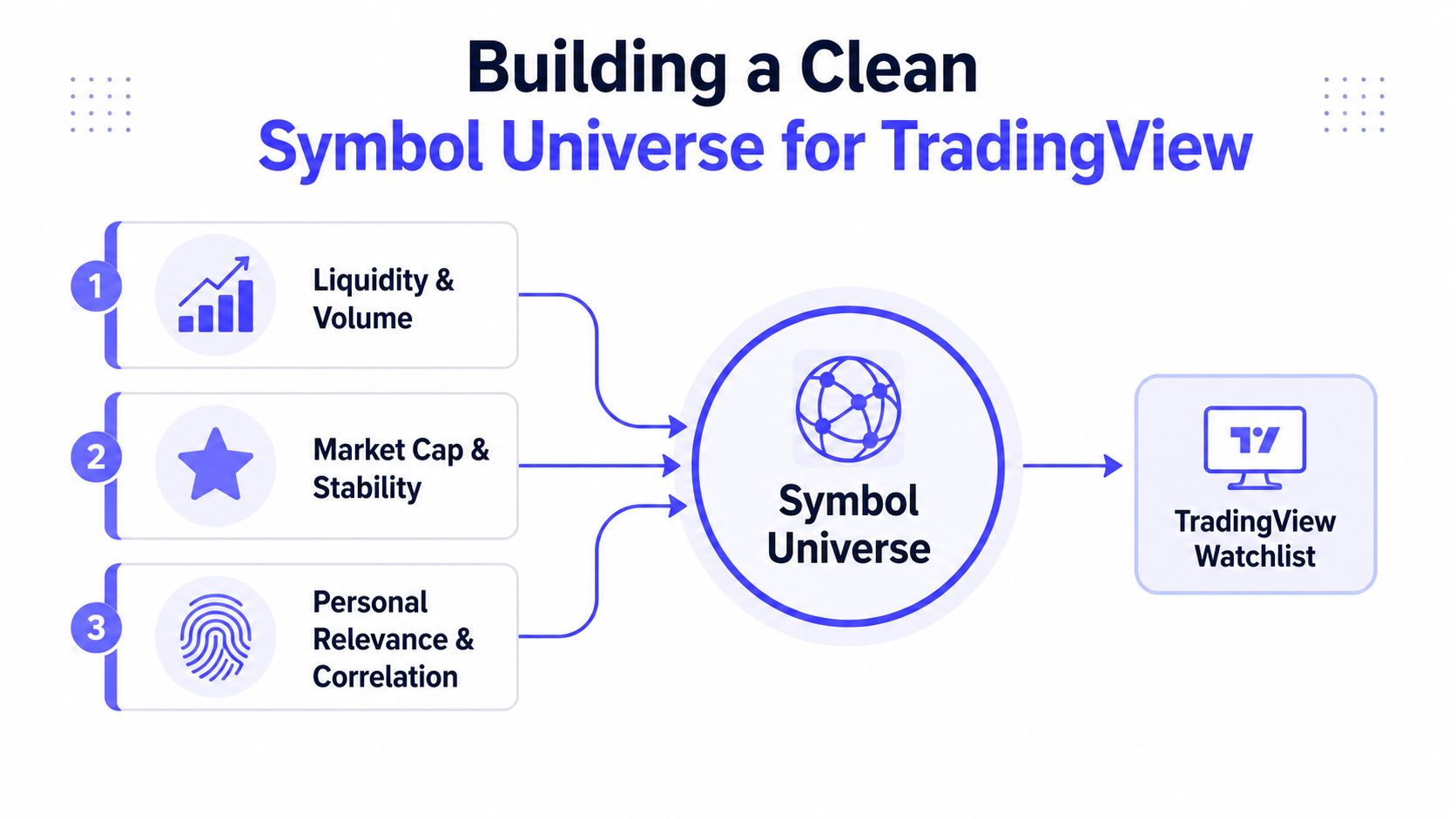
Pair quality also deserves separate attention. CoinMarketCap's market-pair ranking methodology combines reported volume, liquidity score, and web traffic, using dynamic weights rather than raw volume alone. That supports a more careful universe design than sorting by the largest displayed volume.
Hand-curation is the most labor-intensive step because listings, pair structures, and relevance change. A one-off spreadsheet or screener export can be useful for research, but it needs review before becoming a durable watchlist. A maintained source reduces that recurring curation burden, while the user still remains responsible for deciding whether the resulting universe fits the intended workflow.
For a more focused starting point, compare the structure of a crypto pairs list for TradingView.
Connecting a TradingView-Compatible Watchlist Workflow
A maintained symbol universe becomes useful when it fits the same import process every time. The operator downloads a current file, checks the EXCHANGE:TICKER structure, opens TradingView's Watchlist panel, selects Import, and loads the text file. A staging copy should be reviewed before it replaces the active list.
A repeatable operating sequence
Download the source file. Use a list organized around the needed exchange, market-cap group, category, or ecosystem.
Validate the symbols. Check prefixes, pair types, quote currencies, duplicates, and unexpected additions.
Diff against the prior file. Identify newly added, removed, renamed, or changed pairs rather than overwriting blindly.
Import the staged version. Keep the previous file available so a bad change can be reversed without reconstructing the list.
A weekly review is a practical cadence for many active workflows, although the right frequency depends on listing churn and the purpose of the watchlist. A daily refresh cycle at the source can improve the starting point, but it doesn't remove the need for a human review of material changes.
Different list designs support different jobs
Standard watchlists suit broad market-cap buckets or venue-specific monitoring. Custom crypto watchlists narrow the universe using supported market-cap, category, or ecosystem filters. ScreenerList creates a symbol list from market filters, DeltaList compares a reference list with exchange or market variants, and FusionList combines several lists into one exportable configuration.
An external workflow adds value without becoming a portfolio tracker. It organizes, filters, compares, combines, and exports symbols. It doesn't report account balances, calculate tax lots, issue signals, or replace TradingView.
The trade-off is dependency on the maintained source. That dependency is reasonable when it replaces repeated manual cleanup, as long as the operator keeps a review step and doesn't treat an imported file as unquestionable market truth.
A practical screener-oriented workflow can be continued through this guide to a TradingView screener watchlist.
Matching the Right Method to Your Trader Profile
There isn't a universal best crypto portfolio tracker because different users place the main burden in different places. A retail trader may need a fast balance view and a small, reliable chart list. A researcher may care more about raw fields, reproducibility, and the ability to inspect every assumption.
| Trader profile | Primary need | Recommended method | TradingList role |
|---|---|---|---|
| Retail trader | Consolidated monitoring across a few venues | Built-in balance tracker plus maintained TradingView list | Supply organized symbol lists for chart review |
| Researcher or analyst | Flexible fields, historical analysis, and reproducible selection | Spreadsheet plus watchlist | Provide filtered universes for analysis and export |
| Educator or community manager | Clear visuals and repeatable market examples | Third-party dashboard plus TradingView charts | Prepare focused lists for lessons and demonstrations |
| Pine Script author | Clean symbols and consistent chart inputs | TradingView-native workflow | Support prefixed symbol selection and list maintenance |
Retail traders need separation, not maximum software
A trader handling positions across a small number of exchanges often benefits from using the venue or an aggregation app for balances, then keeping the TradingView layer independent. That separation prevents a portfolio dashboard's asset coverage from dictating every chart the trader reviews.
Researchers and market strategists typically need more control. A spreadsheet can preserve filters, assumptions, source dates, and excluded symbols, while TradingView supplies charts and market context. This structure also makes it easier to reproduce a screen later instead of relying on a dashboard that may have changed its universe.
Educators and script authors have different constraints
Educators need a list that can be reused in a lesson, screenshot, or community discussion without unexplained symbol drift. A third-party app may be useful for visual portfolio summaries, but it isn't necessarily the best source for a TradingView lesson.
Pine Script authors and advanced TradingView users place symbol hygiene first. Their workflow depends on exact venue prefixes and consistent instrument types. For them, an organized external list can be more useful than another balance dashboard, provided the output remains compatible with TradingView's import expectations.
The decision should follow the dominant daily task. Monitoring favors aggregation, analytics favors position-aware software, and charting favors a controlled symbol universe.
Practical Questions on Reconciliation and Multi-Chain Tracking
Reconciliation works best when a tracker can read exchange data through restricted API access or read public wallet addresses, then surface changes for manual review. The spreadsheet remains useful for acquisition basis, off-chain holdings, transfers, and exceptions that automated ingestion can't classify confidently.
Multi-chain assets require an explicit naming policy. A team can track them by contract address and chain, use symbols with chain suffixes, or aggregate their value while preserving the underlying chain detail. Each choice affects how balances, cost basis, and chart symbols line up.
A portfolio app may be strong at monitoring and analytics while TradingView is strong at venue-specific market review. Neither layer should be expected to solve the other layer's data problem. The durable setup is usually a tracker for positions, a reconciliation sheet for exceptions, and a TradingView-compatible watchlist built from a clearly defined symbol universe.
TradingList provides maintained standard and custom crypto watchlists organized by centralized exchange, market cap, supported category, and ecosystem, plus ScreenerList, DeltaList, and FusionList for filtered, compared, or combined exports. Visit TradingList to build a cleaner TradingView symbol workflow and spend less time rebuilding watchlists manually.