A screenshot with an exchange logo isn't proof of a listing. Neither is a post from a token team, an aggregator entry, or a TradingView chart that happens to display a similar ticker. Each can be useful for discovery, but none establishes the exact market a trader is preparing to monitor.
The practical answer to how to verify a crypto listing announcement is to treat the claim as a sequence of statuses. Asset identity and network, funding status, trading status, user eligibility, and chart availability are different checks. A maintained TradingView watchlist should receive a venue-specific symbol only after the exchange, market type, quote pair, applicable asset identifiers, current trading status, and any stated eligibility limits agree across official evidence.
Table of Contents
- Why Listing Announcements Need Verification Before They Reach a Watchlist
- Checking Primary Sources and Domain Authenticity
- Verifying the Exact Trading Instrument
- Mapping a Claim to Its Evidence
- Adding a Verified Listing to a TradingView Watchlist
- Post-Listing Maintenance and Red Flags to Watch
Why Listing Announcements Need Verification Before They Reach a Watchlist
The popular advice, “check the exchange's official announcements page,” is necessary but incomplete. An official page can confirm that an exchange is considering an asset without confirming that trading has opened. Kraken's official listings page makes that distinction explicit. It states that roadmap inclusion does not guarantee a listing, and that funding and trading await an official announcement. A roadmap is a signal to research, not permission to add a live instrument to a production watchlist.
A charting platform creates another trap. A visible chart proves that a symbol exists in that platform's data universe, not that a particular exchange has approved the asset, opened trading for the exact instrument, or made it available to every user. A bare ticker such as ABC also fails to identify the venue, quote currency, contract where relevant, or market type. A perpetual contract and a spot pair can share a familiar asset name while representing different instruments.
Practical rule: A listing claim earns a place in a maintained watchlist only when the exact venue-specific instrument and its current trading status have been identified.
Use the evidence ladder to decide the next action:
Rumor: Save the source as a lead. Don't add a tradable symbol.
Roadmap mention: Record the exchange's wording and date. Don't treat it as a confirmed market.
Confirmed announcement: Capture the venue, pair, market type, applicable asset identifiers, launch details if provided, and any stated eligibility limits. A provisional research entry may be appropriate, but status still matters.
Funding status: Record whether deposits or withdrawals are enabled, suspended, delayed, or network-limited. Funding status is separate from trading status.
Trading status: Confirm whether the exchange says trading is live for the exact instrument.
User eligibility: Check whether access depends on the relevant exchange entity, jurisdiction, account type, spot product, margin permissions, or derivatives venue.
Chart availability: Use the chart only after the exchange record and instrument details match. If no matching TradingView feed exists, keep a research note rather than substituting another venue.
This sequence is more useful than reacting to headlines. A watchlist workflow can help organize the result, but organization should follow verification, not replace it. The basic order is simple: find the primary notice, identify the instrument, confirm current trading status, record funding and eligibility limits, then maintain the correct symbol.
Checking Primary Sources and Domain Authenticity
A forwarded message can lead to a real announcement, but the message itself isn't evidence. The safest starting point is a clean navigation path. Type the exchange domain into the browser, open the official app directly, and locate the announcement through the venue's own announcements, blog, support, or listing area.
The FBI advises treating unsolicited contact from someone claiming to represent a cryptocurrency exchange as unverified until the user independently confirms it through the exchange's official website and published contact details. Its guidance on cryptocurrency exchange impersonation also warns against using contact information supplied by the caller. The same principle applies to listing claims, especially when a message creates urgency.
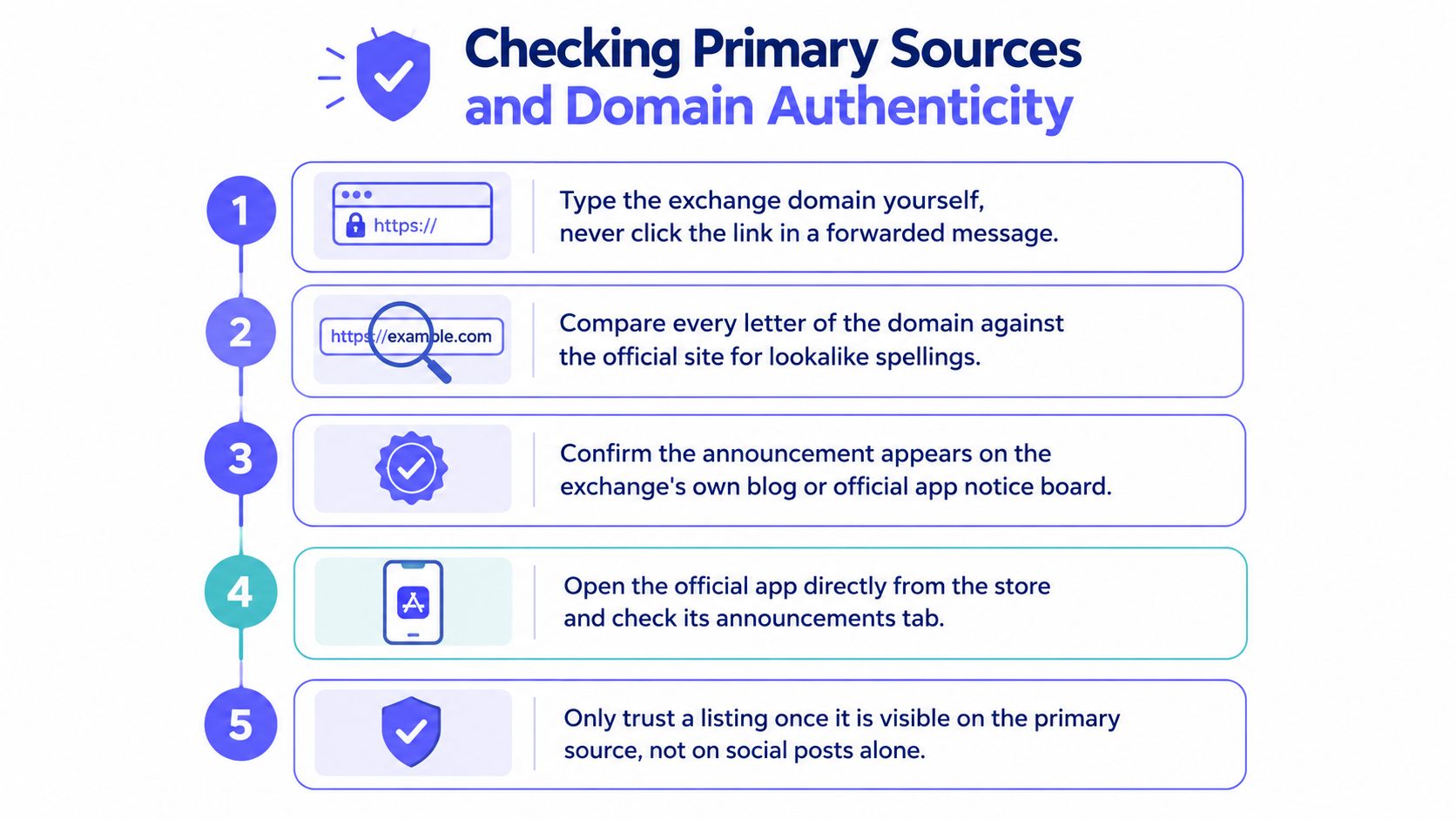
Apply corroboration across official surfaces
The first source should be exchange-controlled. The second should be another official surface from the same exchange that corroborates the same instrument or status. Prefer a dated notice plus current operational status. Suitable combinations include:
The exchange announcement page and the venue's live market or symbol-status endpoint.
The exchange announcement page and the official app's announcement area or market directory.
The exchange announcement page and a verified corporate social account reached from the exchange's official website.
A project's own post is useful corroboration, but it doesn't outrank the exchange's dated notice. A project can announce an intended listing before the venue publishes its decision, misstate the market type, or confuse one regional entity with another.
Kraken's listings page is a useful example of why wording matters. A roadmap entry can identify an asset under consideration, while a confirmed listing notice should establish that the exchange has made a formal announcement. Funding and trading still await the exchange's operational status.
Record time instead of trusting a screenshot
Publication time needs a time zone. Record the original announcement timestamp, then copy any stated deposit, withdrawal, or trading times in UTC. If the exchange provides separate times for funding and trading, keep them in separate fields. If no opening time is stated, record that omission rather than inventing certainty. A screenshot without the original URL, timestamp, and surrounding notice context is easy to misread or alter.
The verification record should include:
Canonical URL: The address opened from the exchange's own domain.
Exchange entity: The exact regional or corporate venue named in the notice.
Publication time: The original timestamp and its UTC conversion.
Official status: Roadmap, announced, funding open or restricted, trading open, or maintenance-related update.
Current operational status: A matching market-status surface, live market directory, or equivalent official page.
Eligibility notes: Any jurisdiction, account, or product restrictions.
Conflict notes: Any mismatch in ticker, network, pair, product type, or timing.
A verified social account can help corroborate that a notice is authentic, but a badge alone isn't authentication. Reach the corporate account from the official website, and treat reposts as corroboration, not market-status proof. The official website or app remains the authority for the exchange's decision.
Verifying the Exact Trading Instrument
A genuine announcement can still produce the wrong watchlist symbol. The critical question isn't merely whether the asset appears in an exchange notice. It's which instrument is opening, on which venue, with which quote asset, and under what current trading status and eligibility conditions.
Capture the following fields before translating the announcement into a chart symbol:
Exchange and entity: A global brand may operate separate regional products or legal entities.
Market type: Spot, margin, perpetual futures, futures, or another product area.
Exact pair: For example, an asset quoted against USD, USDT, BTC, or another supported currency. The trading pair itself is not network-specific.
Asset identity and network: Verify the native asset or, where relevant, the issued token and supported network.
Funding status: Whether deposits or withdrawals are enabled, suspended, delayed, or limited to a stated network.
Trading status: Whether the exchange says trading is enabled for the exact instrument.
User eligibility: Whether access is limited by region, account type, or product permissions.
Trading time: Any stated opening time in UTC, if provided.
Applicable identifiers: For issued tokens, use the contract address and token details where relevant. For native assets such as BTC, mark contract address not applicable and verify the native asset and network instead.
Tickers aren't globally unique. Unrelated assets can use the same or similar symbols, and counterfeit tokens can imitate a legitimate project. The SEC warns that fraudsters can create fabricated websites, fake account balances, and apparently successful investment histories. Its investor alert on social-media investment fraud recommends investigating promoters and avoiding reliance on third-party sites or apps merely because they look legitimate. That guidance helps assess fraud risk, but it does not establish a token's listing status.
Compare identifiers across official records
Where applicable, cross-check the contract address and token details against the project's official documentation and a reputable blockchain explorer. The network should match as well. A project may have multiple deployments, migrations, or wrapped versions, so a name match doesn't settle the identity question. For native assets, verify the native asset and relevant network or chain context instead of looking for a token contract.
Exchange notices may omit addresses or other technical fields. That absence alone is not proof of fraud. It means the reader should confirm applicable identifiers from official project documentation and a reputable explorer before treating the instrument as identified. A verified contract or matching explorer record also does not prove project safety.
A missing pair or trading-status detail is also meaningful. Without those fields, the claim may describe an asset becoming available somewhere, but it doesn't identify a chartable market. The guide to crypto ticker symbols is useful for separating a generic asset label from a venue-specific symbol.
Translate the confirmed pair correctly
Suppose an official notice confirms a spot pair for a hypothetical asset named Alpha Token, ticker ALP, quoted in USDT, on a venue represented in TradingView as EXCHANGE. The expected TradingView-style result would be:
EXCHANGE:ALPUSDT
That string is a fictional formatting example. It isn't evidence that the market exists. The actual prefix, pair spelling, and any product label must come from the exchange and TradingView's own symbol directory. ALP alone identifies an asset label, while EXCHANGE:ALPUSDT identifies a venue-specific market candidate.
A perpetual contract might use a different symbol from the spot pair. Margin access may use the same spot chart, while lending or borrowing eligibility is a separate question. Regional venues may not expose the same instrument as their global counterparts. Product suffixes or labels must be observed in official directories, never invented.
The clean process is to verify the notice first, locate the exchange's live market entry or current status page, then search TradingView for the exact venue and pair.
Mapping a Claim to Its Evidence
The following table uses hypothetical claims, not real listing news. It shows how the justified action changes as evidence improves.
Claim Status Versus Evidence and Watchlist Action
| Claim status | Evidence available | What it proves | Watchlist action |
|---|---|---|---|
| Social-media rumor | A repost, screenshot, influencer message, or Telegram post with no exchange URL | Someone is circulating a claim | Don't add the symbol |
| Roadmap mention | An entry on an official exchange roadmap page | The exchange is considering or previewing the asset, depending on its stated wording | Add a research note only, not a confirmed market |
| Dated confirmed announcement | An exchange-controlled notice with the exact spot or derivatives product, pair, and any applicable identifiers or timing details it provides | The venue has published a formal listing decision for the identified instrument | Record the instrument and wait for current trading status |
| Trading live for the exact instrument | An official market-status surface, market directory, or equivalent exchange-controlled page shows trading enabled for the matching instrument | The identified instrument is currently tradable on that venue, subject to any stated restrictions | Add the verified venue-specific symbol, and record funding restrictions and eligibility separately |
An aggregator entry belongs in the first row unless it leads to matching primary evidence. It can help locate a notice, but it doesn't establish that the exchange approved the listing. The same applies to a screenshot. A screenshot may omit the page title, URL, edit history, regional context, or distinction between spot and perpetual trading.
A confirmed announcement also doesn't mean every user can access the market. The product may be restricted by jurisdiction, account type, or venue entity. Likewise, a visible market page or chart alone does not establish unrestricted trading. If no matching TradingView feed exists for the verified instrument, retain a research note instead of substituting another venue.
Stop when the claim asks for money or credentials
Verification should end immediately when a supposed representative asks you to send money, share a seed phrase, private key, or login, or connect and sign with a wallet merely to confirm an announcement. If funding is required for ordinary exchange use, do it only through an independently opened genuine exchange website or app that you reached yourself, not through a link or contact provided in the message.
The FBI impersonation guidance linked above and the SEC investor alert are useful for spotting fabricated websites, fake support, and false returns. They can help a reader evaluate a suspicious approach, but neither source establishes whether a token is actually listed.
Adding a Verified Listing to a TradingView Watchlist
Once the venue, product, pair, asset identity, and current trading status agree, the symbol can move from a research note into a TradingView watchlist. The safest method is manual validation inside TradingView. Search the exchange prefix together with the exact pair, open the candidate result, and confirm that the exchange or data source, instrument type, and quote asset match the announcement. TradingView's own symbol search guide explains that results show the full name, instrument type, and exchange or data source.
A practical sequence looks like this:
Copy the exact pair from the official notice, including the quote asset.
Confirm the venue prefix shown by TradingView, rather than assuming the exchange's brand name is formatted identically.
Search the full symbol in the form
EXCHANGE:PAIR.Inspect the instrument description to distinguish spot from perpetual, futures, or other product types.
Match the exchange or data source and instrument type before adding anything.
Add only the matching result to the appropriate watchlist.
Record the source URL and check time beside the symbol in the research log.
Keep a research note instead if no matching TradingView feed exists for the verified instrument.
Native TradingView tools remain a fair option for small, temporary lists. A trader can search symbols individually, add them to a list, rename the list by exchange or market type, and remove entries when a venue changes support. That approach offers direct control, but it becomes repetitive when the same exchange universe is rebuilt regularly or when symbols need consistent formatting.
A maintained source list helps with recurring organization, not with immediate listing confirmation. TradingList provides TradingView-compatible watchlists organized by supported centralized exchange, market capitalization, supported category, or ecosystem. Its standard lists and custom crypto watchlists can help a researcher filter a recurring symbol universe after official verification. The TradingView screener watchlist workflow can also support list preparation when the task is organizing symbols rather than validating an exchange announcement.
The limitations matter:
No live status authority: A watchlist source doesn't replace the exchange's announcement or market interface.
Daily source refresh: Source lists can be refreshed on a daily basis, but that is not live synchronization inside TradingView.
Manual download and reimport: Refreshed downloads must be imported into TradingView again.
No listing certification: A symbol list doesn't certify that an exchange has approved or opened a market.
No execution or forecasts: A symbol list doesn't execute orders, generate signals, or predict prices. TradingView can provide alerts separately.
A newly verified market can therefore be added manually, while a maintained exchange list supports the broader recurring universe. Those are separate jobs.
Post-Listing Maintenance and Red Flags to Watch
Verification doesn't end when trading opens. A market can later undergo a ticker change, network change, regional restriction, funding suspension, or delisting. A chart that still opens may represent an inactive, renamed, or economically different instrument.
The exchange's later notices deserve the same attention as the original announcement. Preserve the dated notice as archived text or a timestamped screenshot, because a page can be edited and supported networks or dates can change. Recheck applicable identifiers against the project's current documentation when relevant, inspect the exchange's risk or monitoring label, and confirm funding, trading, and eligibility status separately.
Maintain the symbol record
A compact recurring workflow keeps stale entries from surviving unnoticed:
Review exchange notices: Check listing, maintenance, and delisting pages for the venue.
Compare identifiers: Reconfirm the ticker, pair, native asset or token details, and network where relevant.
Check status fields separately: Record funding status, trading status, and eligibility limits as distinct fields.
Validate the chart: Reopen the TradingView symbol after a rename, restriction, or venue change.
Archive decisions: Keep the original notice, revised notice, and reason for changing the watchlist entry.
The most reliable record is a dated chain of evidence: official announcement, current exchange trading status, matching asset identity and network where relevant, correct venue-specific chart if available, and later maintenance checks. Nothing in this workflow is a buy or sell recommendation.
TradingList offers maintained TradingView-compatible symbol watchlists organized by supported centralized exchange, market cap, category, or ecosystem, which can help organize verified markets after the exchange evidence is complete. Visit TradingList to prepare a cleaner recurring source list, then reimport refreshed downloads manually when the watchlist needs updating.